Anthropic Frontend-Design Skill: Stop AI-Generated UI From Looking the Same
- Smars
- Agent Skills , AI Design
- 08 Jun, 2026
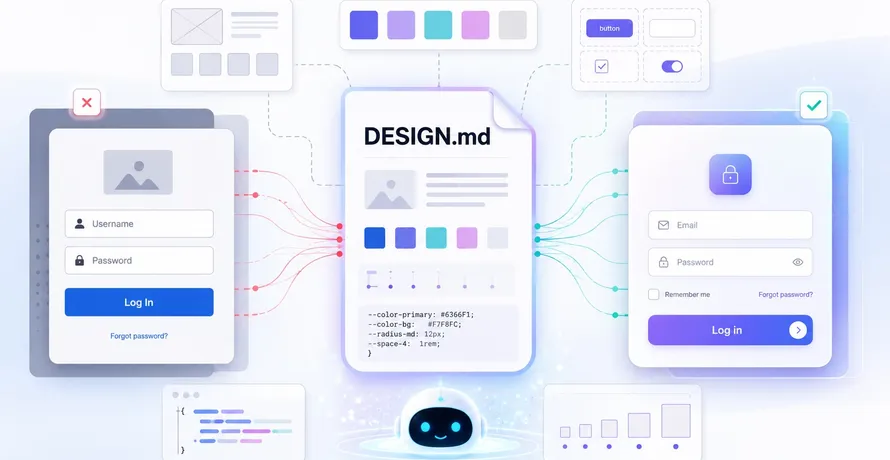
Your AI agent builds a login page. It looks fine. Then it builds a dashboard, and it looks exactly like that login page. And a settings page that looks like both. Three pages, one aesthetic, and you can’t pinpoint what it is because it is nothing. Inter font, purple gradient, rounded cards on white background — the AI slop uniform, stamped out of the same training data every time.
This is not a problem of code quality. The CSS is valid, the components are functional. The problem is that the agent has no taste. It doesn’t pick a direction, commit to it, and execute. It averages every interface it was trained on and gives you the statistical median of the web.
Anthropic’s frontend-design skill solves this by injecting design thinking into the agent’s workflow before any code is written. It doesn’t just generate UI. It forces the agent to make a bold aesthetic choice, then builds everything around that choice.
How It Works
The skill is structured around a design thinking phase that runs before the agent writes any HTML. It asks four questions and demands answers:
| Question | Purpose |
|---|---|
| Purpose | What problem does this interface solve? Who uses it? |
| Tone | Pick an extreme: brutalist, maximalist, retro-futuristic, organic, luxury, playful, editorial, art deco, industrial, or something entirely new |
| Constraints | Framework, performance, accessibility requirements |
| Differentiation | What’s the one thing someone will remember? |
The critical rule: choose a clear conceptual direction and execute it with precision. The skill explicitly rejects compromise aesthetics. Bold maximalism and refined minimalism both work. Indecision does not.
Then it translates that direction into five implementation pillars:
- Typography: No Inter, no Roboto, no system fonts. Unusual font pairings. Display font for headlines, refined body font for text. Characterful choices that define the visual identity
- Color and Theme: CSS variables for consistency. Dominant colors with sharp accents, not timid balanced palettes. Commitment to a visual identity
- Motion: CSS animations and micro-interactions. One well-orchestrated page load with staggered reveals matters more than scattered hover effects. Scroll triggers, surprise states
- Spatial Composition: Asymmetry. Overlap. Diagonal flow. Grid-breaking elements. Generous negative space or controlled density. The anti-bootstrap layout
- Backgrounds and Visual Details: Gradient meshes, noise textures, geometric patterns, layered transparencies, dramatic shadows, custom cursors, grain overlays. Atmosphere over flat color
The skill contains an explicit negative list: no overused fonts, no cliched color schemes (especially purple gradients on white), no predictable layouts, no cookie-cutter component patterns.
Where It Shines
This skill matters most when you’re generating interfaces that need to stand on their own as a design product, not just as functional placeholders.
- Landing pages and marketing sites: These live or die on visual impact. The skill produces pages with a point of view, not template clones
- Portfolios and personal sites: When the site is the portfolio, looking like everyone else is the opposite of the goal
- Dashboards and apps with brand identity: The skill ensures generated screens feel intentionally designed, not assembled from a UI kit
- Prototypes that need to impress stakeholders: A prototype that looks generic gets dismissed as “just a mockup.” One with a bold aesthetic gets taken seriously as a product direction
- Creative projects and art-driven applications: Retro-futuristic, art deco, brutalist — the skill gives the agent a language for aesthetics it otherwise doesn’t have
If you’re building an internal admin panel that nobody sees, you don’t need this. If the interface matters, it matters.
The Real Constraint
The skill’s effectiveness is bounded by two things: the underlying model’s actual ability to write sophisticated CSS, and your willingness to let it be different.
On the model side, Claude Code with Sonnet or Opus handles the visual complexity well. Smaller models may produce the right concept but fumble the implementation details. Animation timing, CSS variable inheritance, responsive edge cases — these still require review and refinement.
On the human side, the generated designs might be unfamiliar. That’s the point. The skill is designed to produce unexpected aesthetics. Some outputs will miss the mark because the agent overcommits to a direction. The prompt framework helps, but taste in design is not something an LLM fully possesses. You still need to judge the output and iterate.
This skill is not a replacement for a designer. It’s a massive upgrade over no design direction at all. The difference between “build me a page” and “build me a brutalist-inspired landing page with heavy typography and monochrome palette” is the difference between a starting point and a near-final result.
Installation
The skill lives in Anthropic’s official skills repository. Installation follows the standard skills CLI:
npx skills add https://github.com/anthropics/skills --skill frontend-designOr clone the repo directly:
git clone https://github.com/anthropics/skills.gitWorks with Claude Code and other compatible agents that support the skills format.
How to Use It
The skill is triggered automatically when you ask your agent to build any kind of frontend interface. The key is in what you say.
Good input:
Build a landing page for a project management tool
Vague enough that the skill’s design thinking framework kicks in and guides the agent toward a specific direction.
Better input:
Build a landing page for a project management tool targeted at design teams. They need something creative, not corporate
This gives the agent context to make a more targeted aesthetic choice.
The agent will:
- Analyze your request for purpose, audience, and constraints
- Propose a specific aesthetic direction and tone
- Plan typography, color, motion, layout, and visual details
- Implement working code that executes the vision
The code is production-grade and functional. HTML/CSS/JS, React, or Vue depending on your project’s stack.
If you want a specific direction upfront, you can specify it directly:
Build a landing page with a retro-futuristic aesthetic, terminal-inspired color scheme, and geometric typography
This still goes through the full design thinking process but starts with a clear direction.
Example in Practice
Say you want to build a portfolio site for a photographer. Without the skill, the agent would produce a clean, generic gallery with Inter font, subtle shadows, and predictable grid layout. The kind of site that merges into every other portfolio you’ve ever visited.
With the skill loaded, the agent considers the context: photography, visual art, an individual creator. It might choose an editorial/magazine direction with large serif headlines, asymmetric layouts where images overlap navigational elements, generous whitespace, and a restrained two-tone color palette. Or it might go brutalist, with raw grid lines, no decoration, oversized text, and full-bleed imagery.
The output is a single file you can open in your browser. You can see the vision immediately. If the direction is right, you iterate on content. If it’s not, you adjust the aesthetic parameters and regenerate.
The Bottom Line
Frontend aesthetics are not a luxury concern. They are the first thing anyone sees. A generic-looking interface signals a generic product. A distinctive interface signals intentional craft, even if the underlying code is generated.
Anthropic’s frontend-design skill gives AI coding agents something they naturally lack: a design process. It replaces “make it look nice” with “choose a direction, commit to it, execute it.” The result is interfaces you can’t immediately dismiss as AI-generated.
Next time you ask your agent to build a page, don’t settle for the statistical average of every website it was trained on. Give it a direction. Or let it pick one.
GitHub: https://github.com/anthropics/skills | Skills: https://www.skills.sh/anthropics/skills/frontend-design